VisML
Rumima Enterprise Studio · Licensed extension

Design the harness.
Run it anywhere.

The HarnessXML extension turns a Rumima map into an executable workflow. Draw the graph, export .hxml, and run it on any conforming runtime — including ones VisML did not write.

The pipeline

One design, four steps, no lock-in.

Author
Rumima Studio
Saved as
.rmmx
Export — open
.hxml
Executed by
any runtime

A Rumima document is saved as .rmmx. Inside it, the .visml markup standard carries everything Rumima needs that a workflow does not — canvas layout, colours, grouping, editor state, and the finetuning and attribute injection described below.

Embedded in that document is a complete HarnessXML element. Export lifts it out; import wraps it back. Nothing is translated, so nothing is lost in translation — which is what makes the round trip safe to rely on.

Only .hxml crosses the boundary. The runtime is handed the exported document and never sees .rmmx or .visml. That is deliberate: it is what makes the runtime replaceable, and it is why the workflow you design here is not hostage to this tool.

Worked example

A document-triage harness, from map to run.

A Rumima map where every node is a step. The tree is the workflow — not a picture of it.

document_triage.rmmx
├─ receive              source     → document, filename
├─ extract_text         transform  → text            [retry ×3]
├─ classify             inference  → category, confidence
│                                        [model: claude-opus-5]
│                                        [retry ×4, rate_limit transient]
├─ route                decision
│   ├─ confidence ≥ 0.90   → auto_file
│   └─ otherwise           → human_review
├─ auto_file            task
├─ human_review         human      [NOT idempotent]
└─ notify_failure       sink       ← error edge from classify

Inside the .rmmx

The container holds the map. The .visml markup carries presentation and tuning; the embedded <harness> carries the executable workflow:

<visml xmlns="https://visml.com/schema/1.0" product="rumima">
  <rumima-document version="1">

    <!-- Presentation. Never leaves the .rmmx: a workflow's meaning
         cannot depend on where a box sits. -->
    <canvas>
      <place node="classify" x="420" y="180" colour="#f0b04e"/>
      <place node="route"    x="640" y="180"/>
    </canvas>

    <!-- Finetuning. Resolved AT EXPORT into concrete values. -->
    <tuning>
      <weight node="classify" attribute="confidenceFloor" value="0.90"/>
      <variant name="conservative" confidenceFloor="0.95"/>
      <variant name="throughput"   confidenceFloor="0.80"/>
    </tuning>

    <!-- The executable workflow: a COMPLETE HarnessXML document. -->
    <harness xmlns="https://harnessxml.com/spec/1.0"
             id="document_triage" specVersion="1.0" entry="receive">
      <resources>
        <resource id="classifier" type="model" provider="anthropic">
          <property name="model" value="claude-opus-5"/>
          <credential ref="ANTHROPIC_API_KEY" store="vault"/>
        </resource>
      </resources>
      <nodes>
        <node id="classify" type="inference">
          <outputs>
            <output name="category"   type="string"/>
            <output name="confidence" type="number"/>
          </outputs>
          <resourceRef ref="classifier" role="model"/>
          <retry maxAttempts="4" backoff="exponential"
                 retryOn="rate_limit transient"/>
          <timeout duration="PT3M" onTimeout="retry"/>
        </node>
        <node id="route" type="decision">
          <cases>
            <case when="${classify.confidence &gt;= 0.90}" to="auto_file"/>
            <otherwise to="human_review"/>
          </cases>
        </node>
        <node id="human_review" type="human" idempotent="false"/>
      </nodes>
      <edges>
        <edge from="classify" to="route"          type="control"/>
        <edge from="classify" to="notify_failure" type="error"/>
      </edges>
    </harness>

  </rumima-document>
</visml>

Export

Export lifts the <harness> element out unchanged. The result validates against the published schema and runs anywhere:

$ harnessxml validate document_triage.hxml
document_triage.hxml: valid

$ harnessxml run document_triage.hxml --scenario rate-limited.txt
classify         SUCCEEDED   (attempt 3, after 2 retries)
route            SUCCEEDED   routed to 'auto_file'
human_review     PENDING     (never reached)
document_triage.hxml: succeeded
See it

Real maps, in the real product.

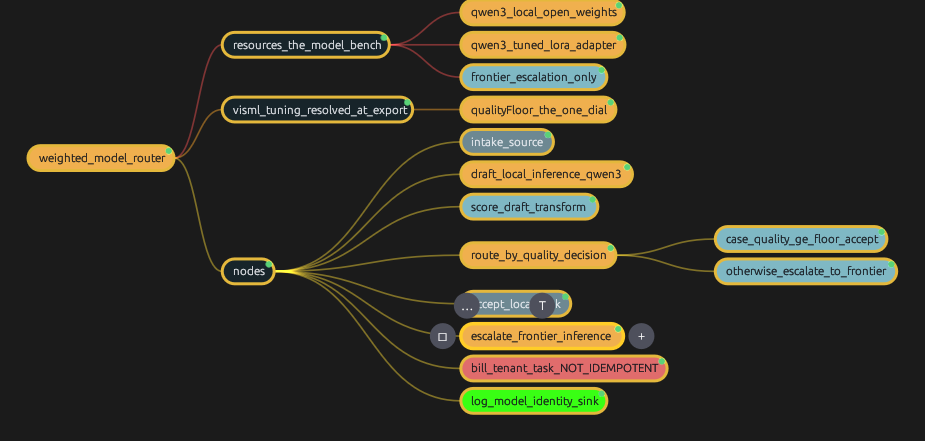
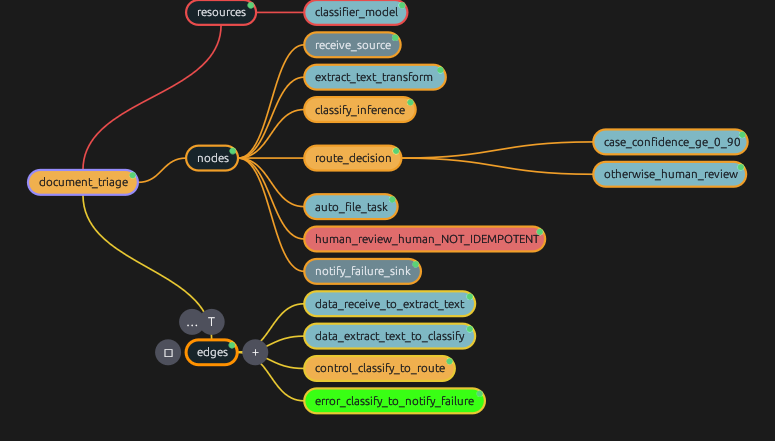
Both screenshots below are captures of Rumima Enterprise Studio rendering the .rmmx documents linked beside them. Not mock-ups — the maps are published, and you can open them yourself.

the lit path — inference & decisions structure — transforms & data danger — never auto-retry boundaries
Rumima Enterprise Studio showing the document_triage harness: a root node branching into resources, nodes and edges, with the inference and decision nodes in gold, transforms in teal, and the non-idempotent human review step in red.
document_triage — the five typed edge relationships, a confidence-gated decision, a non-idempotent human step drawn in red, and an error path. The tree is the workflow.  ·  document-triage.rmmx
Rumima Enterprise Studio showing the weighted_model_router harness: a model bench of qwen3 local, a qwen3 LoRA-tuned variant and a frontier model, a visml tuning branch carrying the quality floor, and a decision routing between local acceptance and frontier escalation.
weighted_model_router — a local qwen3 tried first, an independent weighted score, and escalation to a frontier model only when the score falls below the floor. The tuning branch carries the one dial that decides cost.  ·  weighted-model-router.rmmx

A node showing green is Rumima's current selection highlight, not a harness colour. Every node's description carries its HarnessXML fragment, so the maps are readable as documentation even without the extension.

What the extension adds

The hard part of an LLM workflow is the failure surface.

Anyone can draw prompt → model → output. What breaks in production is rate limits, partial failures, silent fallbacks and steps that must never be retried. Those are invisible in code and obvious in a graph — which is the whole reason to design one visually.

Five relationships, drawn differently

Control, data, dependency, error and compensation are distinct edge types with distinct scheduling meaning — and distinct rendering on the canvas.

If you cannot tell an error path from a data path at a glance, the picture is not showing you the workflow.

Idempotence on the node, not in a panel

A step marked non-idempotent is flagged on the canvas itself, and the studio refuses to attach a retry policy to it.

Getting this wrong charges the card twice. It deserves to be visible without clicking.

Inline validation while you draw

Every rule in the specification carries an HX-nnnn code. They surface on the canvas, at the node, as you work — not in a modal after export.

A dangling edge or an unbounded loop should never survive to a build.

Bounded loops, enforced

A loop will not draw without maxIterations. There is no unbounded form to reach for.

An unbounded loop in an unattended workflow is a defect, not a feature — and with LLM calls it is also a bill.

Simulate before you spend

Script the outcomes — “the model rate-limits twice, then returns 0.62 confidence” — and watch the escalation path execute with zero API calls.

Prove the low-confidence path works before a customer discovers it does not.

Replay a real run onto the canvas

Execution traces are part of the specification, so a run from any conforming runtime replays here: nodes light up SUCCEEDED, RETRYING with its backoff, FAILED, COMPENSATED — and the branch not taken stays dim.

Only a visual tool can do this, and it is the fastest way to understand what actually happened.

Cost and fan-out, computed

Loop bounds and concurrency are declared in the document, so the worst-case number of model calls is computable before a single one is made.

“This design can make 480 calls” is worth knowing in the designer, not on the invoice.

Variants and finetuning

Tune thresholds, weights and attributes as named variants in the map, and export each as its own concrete, validated .hxml.

Every variant is a real document with its own identity, so you can always say which one ran.
The part most tools will not offer you

You can leave.

The format this extension writes is not ours to withhold. HarnessXML is an open specification: the text is CC BY 4.0, the schema and reference code are Apache 2.0, and anyone may implement it commercially without permission, royalty or an agreement to sign.

Your workflowsplain .hxml files, diffable and reviewable in a pull request
Your runtimeany conforming implementation — three already pass the suite, in Rust, Python and Go
Your editorbuild your own against the published schema; nothing here is required
If VisML stopsthe licences already granted are irrevocable; the specification stays forkable

VisML both stewards the specification and sells this extension. That is a real conflict of interest, and it is named explicitly in the published governance model — along with the structural limits on it: Rumima gets no privileged extension point, the reference runtime is not Rumima, and conformance is decided by a public test suite rather than by agreement with our product.

If Rumima and the specification ever disagree, the specification is right and Rumima has a bug. That is a published commitment, not a courtesy.

Which leaves exactly one honest reason to license this extension: because designing a harness visually is faster and clearer than writing one by hand — not because leaving would cost you your work.

Availability

A licensed extension to Rumima Enterprise Studio.

HarnessXML support is built into Rumima Enterprise Studio and activated with a licence key. It is an additional licensed feature on top of a Studio seat.

ModelSubscription add-on to a Rumima Enterprise Studio seat
PricingBy quote. It depends on seat count, deployment shape and whether you self-host the collaboration hub — so we would rather give you a real number than a misleading list price
RequiresRumima Enterprise Studio, any seat tier
Activationlicence key; the 10-day offline window applies as usual
SpecificationHarnessXML 1.0 — draft
Export.hxml, validated on write

Tell us roughly how many seats, whether you self-host, and what you are building — LLM orchestration, robotics, network or business automation. We will come back with a figure and a trial licence.